webrankinfotech

WebRank Infotech is a digital marketing agency helping businesses grow online through smart SEO, Google Ads, and web solutions. We turn clicks into customers.

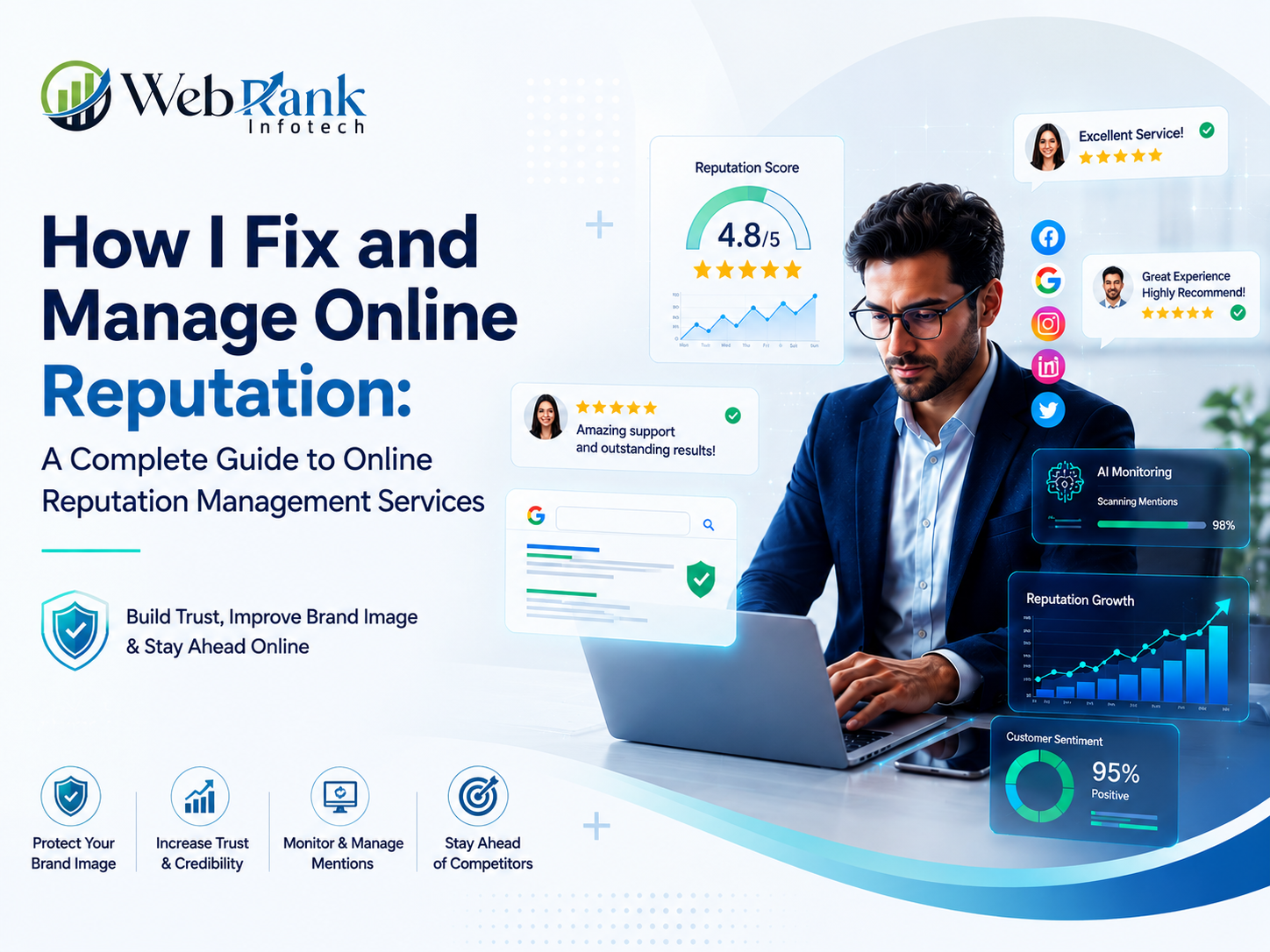
How I Fix and Manage Online Reputation: A Complete Guide to Online Reputation Management Services

How I Fix and Manage Online Reputation: A Complete Guide to Online Reputation Management Services

If you’re searching for online reputation management services, you’re probably staring at a bad review, a damaging news article, or an old post you wish never existed. Here’s the crux of what I’ve learned after years of running SEO campaigns alongside reputation repair: fixing your online reputation isn’t about deleting the internet — it’s about outranking the bad content with better, more authoritative content, backed by the same SEO principles that rank any website. I write this guide from my own experience managing both SEO and ORM campaigns. I’m not going to give you fluff about “building your brand story.” I’m going to show you exactly how I diagnose a damaged reputation, fix it, and keep it protected — step by step. What Is Online Reputation Management, and Why Does It Matter Right Now? Online reputation management (ORM) is the practice of monitoring, influencing, and improving what people see when they search your name or business online. It combines search engine optimization, content creation, review management, and monitoring to control the narrative that Google shows about you. Wikipedia’s entry on reputation management describes it as <cite index=”2-1″>the deliberate influence, control, enhancement, or concealment of an individual’s or group’s reputation, used as a marketing technique to shape perception in a positive way</cite>, and notes that the online version specifically <cite index=”2-1″>focuses on overseeing and influencing the search engine results related to products and services</cite>. I tell every client the same thing: your reputation isn’t what you say about yourself — it’s what the first page of Google says about you. If that page shows a lawsuit, a scam accusation, or a string of 1-star reviews, no amount of advertising will fix the damage. People check before they buy, hire, or trust. What Counts as Your “Online Reputation”? Your online reputation includes Google search results for your name or brand, reviews on Google Business Profile, Glassdoor, Trustpilot, and industry-specific platforms, social media mentions, news coverage, forum threads (Reddit, Quora), and even autocomplete suggestions Google shows when someone starts typing your name. Why I Tell Every Client Reputation Now Outranks Advertising Consumers check multiple review sources before deciding whether to trust a business, and a large share won’t consider a business with a poor average rating, according to BrightLocal’s annual consumer review survey. I’ve seen this play out directly in campaigns — a client with a 4.8-star rating converts at almost double the rate of a competitor stuck at 3.2 stars, even when both run identical ad spend. In short: Online reputation management is the discipline of controlling your Google search results and review profile so the first thing people see builds trust instead of doubt. It sits at the intersection of SEO, PR, and review management, and it directly affects revenue, hiring, and trust — not just vanity metrics. How Do Online Reputation Management Services Actually Work? Most agencies (including how I structure my own process) follow five connected stages. I’ll break each one down so you know exactly what you’re paying for when you hire an ORM provider. Step 1: Reputation Audit and Sentiment Mapping I start by searching the client’s name/brand across Google, Bing, YouTube, and image search — exactly how a customer or employer would. I map every result on page one and two, categorize each as positive, neutral, or negative, and check review platforms for sentiment trends. Step 2: Negative Content Suppression and Removal Where content violates platform policies (fake reviews, defamation, doxxing), I pursue removal directly. Where it doesn’t qualify for removal, I use SEO to push it down by outranking it with stronger content — this is where reputation management overlaps directly with SEO services. Step 3: Positive Asset Creation I build a “content wall” — a set of owned and earned assets (website pages, press mentions, profiles, social proof) designed to rank above the negative result. This isn’t generic content; it’s built around the exact keywords people search alongside the client’s name. Step 4: Review Generation and Response Management I set up systematic review request flows and respond to every review, positive or negative, professionally and promptly. Response quality matters almost as much as the review itself — a thoughtful reply to a bad review often reassures future customers more than a 5-star review does. Step 5: Ongoing Monitoring I set up alerts (Google Alerts, brand monitoring tools) so new negative content gets caught within hours, not months. Reputation management is never a one-time fix — it’s a maintenance discipline. In short: ORM services work by auditing your current search footprint, suppressing or removing harmful content, publishing authoritative positive content, actively managing reviews, and monitoring continuously. Each stage feeds the next — skipping the audit or monitoring stage is the most common reason reputation campaigns fail long-term. How Do I Fix a Damaged Online Reputation? My Step-by-Step Guide This is the exact process I run when someone comes to me with a reputation crisis — whether it’s a personal name issue or a business one. Step 1: I Search My Name or Brand the Way a Stranger Would I open an incognito browser and search my exact name/brand, plus common variations (misspellings, “[name] reviews,” “[name] scam,” “[name] complaints”). I screenshot every result on the first two pages. Step 2: I Identify the Source and Severity of Each Negative Result I classify each negative item: Step 3: I Attempt Direct Removal First For content that violates a platform’s policy, I file a takedown request directly with the platform. For search-result-level personal information, Google allows individuals to request removal of certain personal data through its dedicated tool, as outlined on Google’s own removal support page. Direct removal is always faster and more permanent than suppression, so I always try this route before anything else. Step 4: I Build a Content Wall of Positive, High-Authority Assets I publish and optimize content on high-authority domains — a well-structured personal or business website, guest features, press mentions, LinkedIn articles, and profile pages on trusted directories. Each asset targets the

How I Fix and Manage Online Reputation: A Complete Guide to Online Reputation Management Services Read More »

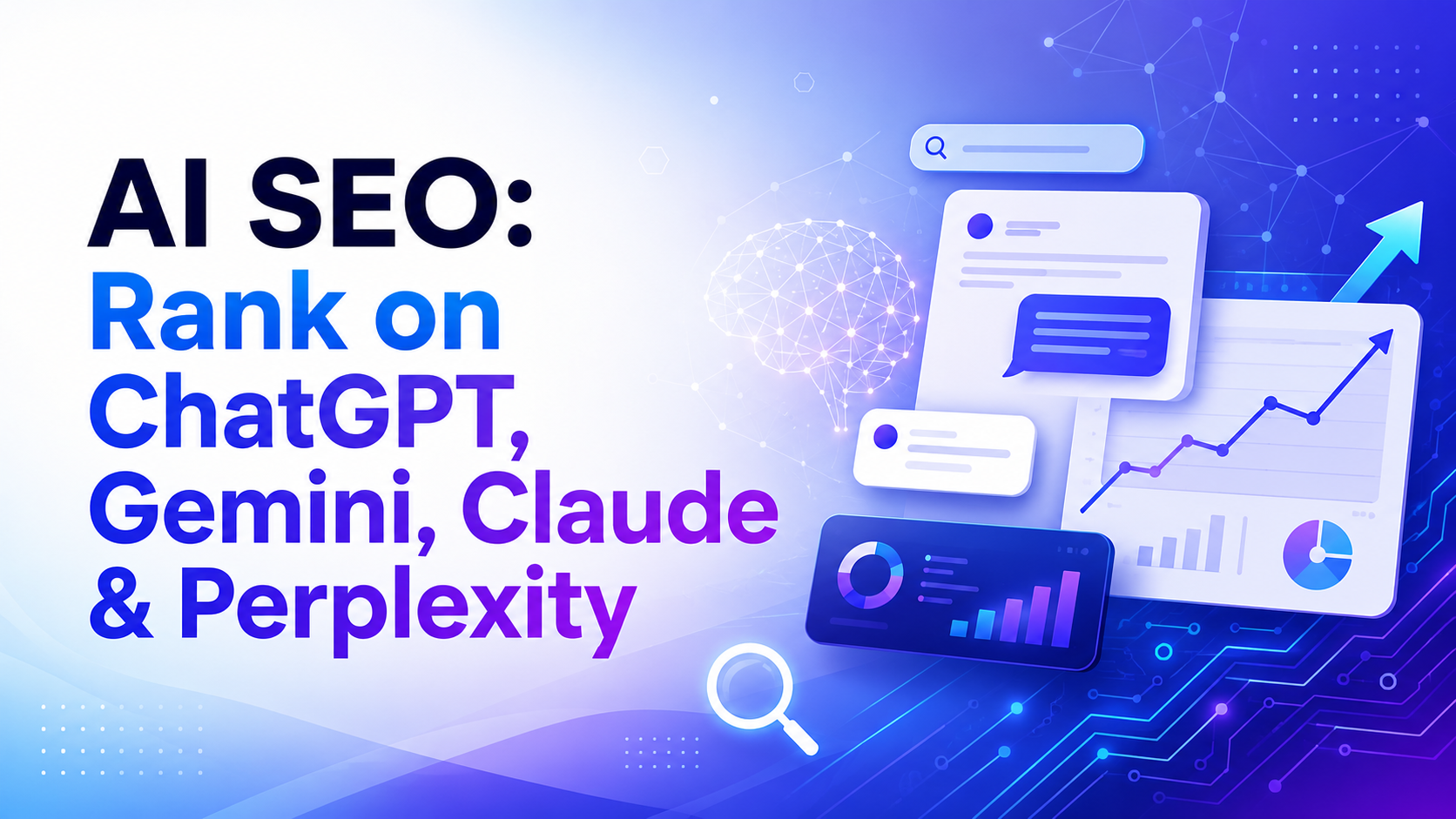
AI SEO: Rank on ChatGPT, Gemini, Claude & Perplexity

AI SEO: Rank on ChatGPT, Gemini, Claude & Perplexity

If you’re ranking #1 on Google and still invisible in ChatGPT, Gemini, or Perplexity, you’re not failing at SEO — you’re solving the wrong problem. AI search engines don’t rank pages the way Google does; they retrieve, filter, and cite them through an entirely different pipeline. I’ve spent the last two years watching this shift happen in real client data, and the businesses winning right now aren’t the ones with the highest domain authority. They’re the ones who understood, early, that AI SEO is a separate discipline from traditional SEO — related, but not the same game. Search is splitting in two. One half still looks like ten blue links. The other half is a single generated answer, and your brand either gets named in it or it doesn’t exist for that searcher. This is why AI SEO — sometimes called GEO (Generative Engine Optimization) or AEO (Answer Engine Optimization) — has stopped being a “nice to have” for forward-thinking marketers and become the single highest-leverage channel most businesses are underinvesting in. Here’s why this matters right now. Google’s AI Overviews now appear on a large share of informational searches, and Google AI Mode has its own separate retrieval logic. ChatGPT has hundreds of millions of weekly users asking product and buying questions directly. Perplexity cites sources in nearly every answer it gives. Claude increasingly gets used for research and comparison tasks by people who never touch Google at all. None of these systems reward the same signals Google’s classic algorithm rewards, and I want to walk you through exactly what does work with AI SEO, platform by platform, with the mechanics, not the hype. I write this from direct, hands-on testing — running the same prompts across ChatGPT, Gemini, Claude, and Perplexity repeatedly, watching which of my own and my clients’ pages get pulled in and which get ignored. What follows is the clearest picture I can give you of how each of these systems actually decides what to trust, and how a deliberate AI SEO strategy should account for each one. Table of Contents What Is AI SEO? AI SEO is the practice of optimizing your website, content, and brand presence so that AI-powered search and chat systems — ChatGPT, Google Gemini/AI Overviews, Claude, Perplexity, and Bing Copilot — retrieve, reference, and recommend you in their generated answers. It sits at the intersection of three older disciplines: I think of AI SEO as the umbrella term a business owner actually searches for, while GEO and AEO are the technical sub-disciplines underneath it. If you’re building an AI SEO strategy, you need all three working together: you can’t get cited in an AI answer if your site isn’t even indexed, and you can’t win an AI Overview if your content doesn’t answer the question directly in the first few sentences. The core shift AI SEO asks you to make: stop optimizing purely for rank position, and start optimizing for extractability and trust. An AI model doesn’t scroll through your page and give you credit for keyword placement. It pulls a chunk of your content, decides if it can attribute a claim to you confidently, and either includes you or moves to the next candidate. Quick Summary: AI SEO is the umbrella strategy for getting cited and recommended inside AI-generated answers across ChatGPT, Gemini, Claude, and Perplexity. It combines classic SEO fundamentals with GEO (making content citable) and AEO (making content answer-first), and it succeeds or fails based on whether your content is extractable, trustworthy, and specific enough for an AI system to confidently attribute a claim to you. Why Is AI Search Changing the Rules of SEO? AI search is changing the rules of SEO because it removes the click. In classic search, Google shows you ten options and you choose. In AI search, the system chooses for the user and hands them one synthesized answer with a handful of citations. If you’re not one of those citations, you don’t just rank lower — you don’t exist in that interaction at all. Three structural shifts are driving this: I’ve watched this play out with clients who were previously obsessed with page-one Google rankings, only to discover competitors dominating the exact same buyer questions inside ChatGPT and Perplexity — competitors who, in some cases, don’t even rank in Google’s top 10 for that keyword. Traditional SEO alone no longer guarantees discovery. It’s necessary infrastructure for AI SEO, but it isn’t sufficient on its own. Quick Summary: AI search replaces a ranked list of links with a single synthesized answer and a small set of citations, so classic rank position matters less than it used to. Data shows AI Overview citations increasingly come from outside Google’s top 10, and AI chat platforms are becoming a primary research step before a purchase — meaning traditional SEO is necessary but no longer sufficient on its own. How Is AI SEO Different From GEO and AEO? Short answer: they’re not competing strategies — they’re layers of the same AI SEO stack. Discipline What it optimizes for Primary systems Core tactic SEO Ranking position on search engine results pages Google, Bing Keywords, backlinks, technical health, content depth AEO (Answer Engine Optimization) Being the direct answer to a specific question Featured snippets, voice search, AI Overviews Answer-first structure, Q&A formatting, concise definitions GEO (Generative Engine Optimization) Being cited/quoted inside a generative AI response ChatGPT, Gemini, Claude, Perplexity Statistics, quotations, citations, entity clarity, structural extractability AI SEO The umbrella outcome — visibility across all AI-driven discovery surfaces All of the above Combines SEO + AEO + GEO into one coordinated strategy The peer-reviewed paper that formalized GEO (Aggarwal et al., 2024, presented at KDD, from researchers at Princeton, Georgia Tech, and IIT Delhi) tested this scientifically: adding cited statistics, direct quotations, and clear citations to a passage boosted its visibility inside generative answers by up to 40%, with some techniques producing gains as high as 30–115% depending on the query category. That’s not marketing copy —

AI SEO: Rank on ChatGPT, Gemini, Claude & Perplexity Read More »

Google Core Update Recovery

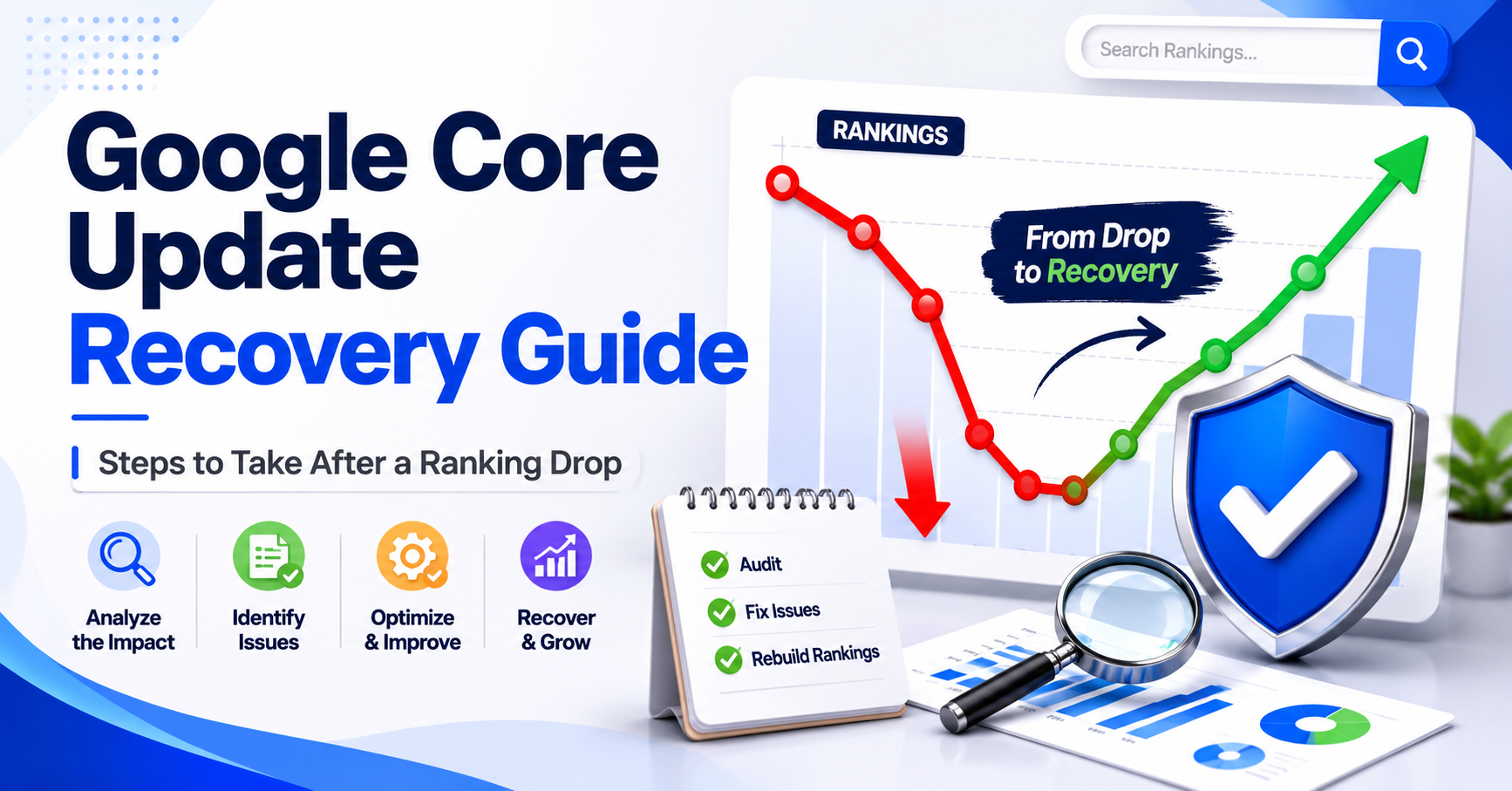
Google Core Update Recovery: 8 Proven Steps to Regain Lost Rankings Fast

So your rankings dropped overnight. You opened Google Search Console and the traffic graph looked like it fell off a cliff. If this happened to you after the Google May 2026 core update, you are not alone. Thousands of websites saw major ranking shifts starting May 21, 2026. At WebRank Infotech, we have been tracking this update since day one and helping businesses in Chandigarh and across India bounce back. This is your complete Google core update recovery plan — honest, practical, and easy to follow. What Is a Google Core Update and Why Did Your Rankings Drop? A Google core update is a broad change to Google’s main ranking systems. It is not a penalty — it is Google reassessing which pages deserve to rank higher based on quality, relevance, and trust. The May 2026 Google core update is the second core update of this year after March 2026. It uses Gemini-based AI quality models to evaluate content, making it significantly smarter at detecting thin, unhelpful, or AI-spun pages. A ranking drop after a core update means one thing: competing pages are currently scoring higher on Google’s quality signals than yours. That is fixable. Step 1: Wait for the Rollout to Complete Before Panicking The May 2026 core update started on May 21 and completes around June 4, 2026. Rankings are extremely volatile during this window. Do not do this while the update is rolling: Do this instead: Patience is not weakness here. It is strategy. Step 2: Identify Exactly Which Pages Were Hit Go to Google Search Console → Performance Report. Compare the two weeks before May 21 against the current period. Look for: Group pages by type: blog posts, service pages, homepage. Each group needs a different fix. For further analysis, check tools like Google Search Console and Ahrefs to compare ranking changes before and after the update. Step 3: Run a Content Quality Audit on Every Dropped Page This is where most Google core update recovery work happens. The May 2026 update specifically targets: For every page that dropped, ask honestly: Is this genuinely helpful? Not just accurate — useful to someone with a real problem. Does it answer the query completely? Partial answers cause bounces. Google notices. Does it show real expertise? Specific examples, original insights, practical detail that goes beyond generic information. Is it up to date? Outdated content on fast-moving topics like SEO loses trust signals fast. Rewrite weak sections. Add specific examples. Update statistics. Do not just add words — add value. Step 4: Strengthen Your E-E-A-T Signals E-E-A-T — Experience, Expertise, Authoritativeness, Trustworthiness — is central to the May 2026 update. Here is what to fix: Author bios on every blog post. “Posted by Admin” tells Google nothing. Add a proper author page with name, photo, credentials, experience, and LinkedIn link. Show business credentials clearly. Team experience, Google certifications, industries served, and client results should be visible on your homepage and About page — not buried in a footer. Get third-party validation. Google Business Profile reviews, Clutch profiles, and GoodFirms listings build the off-site authority signals that Google cross-references with your on-site claims. Add trust elements. Privacy policy, real address, phone number, and a clear About page all contribute to trustworthiness scores. Step 5: Fix Technical SEO Issues Amplifying the Drop Core updates amplify existing technical problems. Run your site through Google PageSpeed Insights and fix: Also check: Step 6: Add Schema Markup to Every Page Zero schema markup means zero eligibility for rich results or Google AI Overviews. For a digital marketing agency, add: Schema markup is one of the top signals for appearing in Google AI Overviews — the most visible real estate in search results right now. Step 7: Build Off-Page Authority Strong content on a weak domain will still struggle after a core update. Fix your off-page signals: List your business on Clutch and GoodFirms. These are the platforms Google and AI engines like ChatGPT and Perplexity cite when recommending service providers. A complete profile with real reviews makes you citable. Earn backlinks through original content. Research posts, data studies, and comprehensive guides attract natural links. Guest posts on reputable Indian digital marketing blogs build relevant authority fast. Fix NAP consistency. Your Name, Address, and Phone number must match exactly across your website, Google Business Profile, Justdial, Sulekha, and every directory. One mismatch breaks local trust signals. Step 8: Monitor Recovery and Stay Consistent Google core update recovery follows a predictable timeline: Consistency between updates is what separates websites that recover from those that stay stuck. The Bottom Line A Google core update recovery is not about tricks or shortcuts. It is about building a website that genuinely deserves to rank — helpful content, real expertise, solid technical foundation, and trusted brand signals. The May 2026 Google core update is not the end for your website. For businesses willing to do the work, it is the starting point of a stronger, more sustainable search presence. At WebRank Infotech, we offer hands-on core update recovery audits for businesses in Chandigarh, Mohali, and across India. Contact us today to find out exactly what your website needs to recover and grow. Frequently Asked Questions on Google Core Update Recovery What is Google core update recovery? Google core update recovery is the process of identifying why your website lost rankings after a broad Google algorithm update and systematically improving content quality, technical SEO, and authority signals to regain and improve those rankings. How long does Google core update recovery take? Recovery typically takes 1 to 3 months of consistent improvement. The biggest gains usually happen after the next core update when Google re-evaluates your improved pages. Did the May 2026 Google core update penalise my website? No. Core updates are not penalties. A ranking drop means competing pages scored higher on Google’s quality assessment. There is no manual action and no disavow process needed — only content and trust improvements. Which pages should I fix first for Google core update

Google Core Update Recovery: 8 Proven Steps to Regain Lost Rankings Fast Read More »

SEO and AEO Strategy: The Complete Guide to Rank on Google and Win AI Citations

SEO and AEO Strategy: The Complete Guide to Rank on Google and Win AI Citations

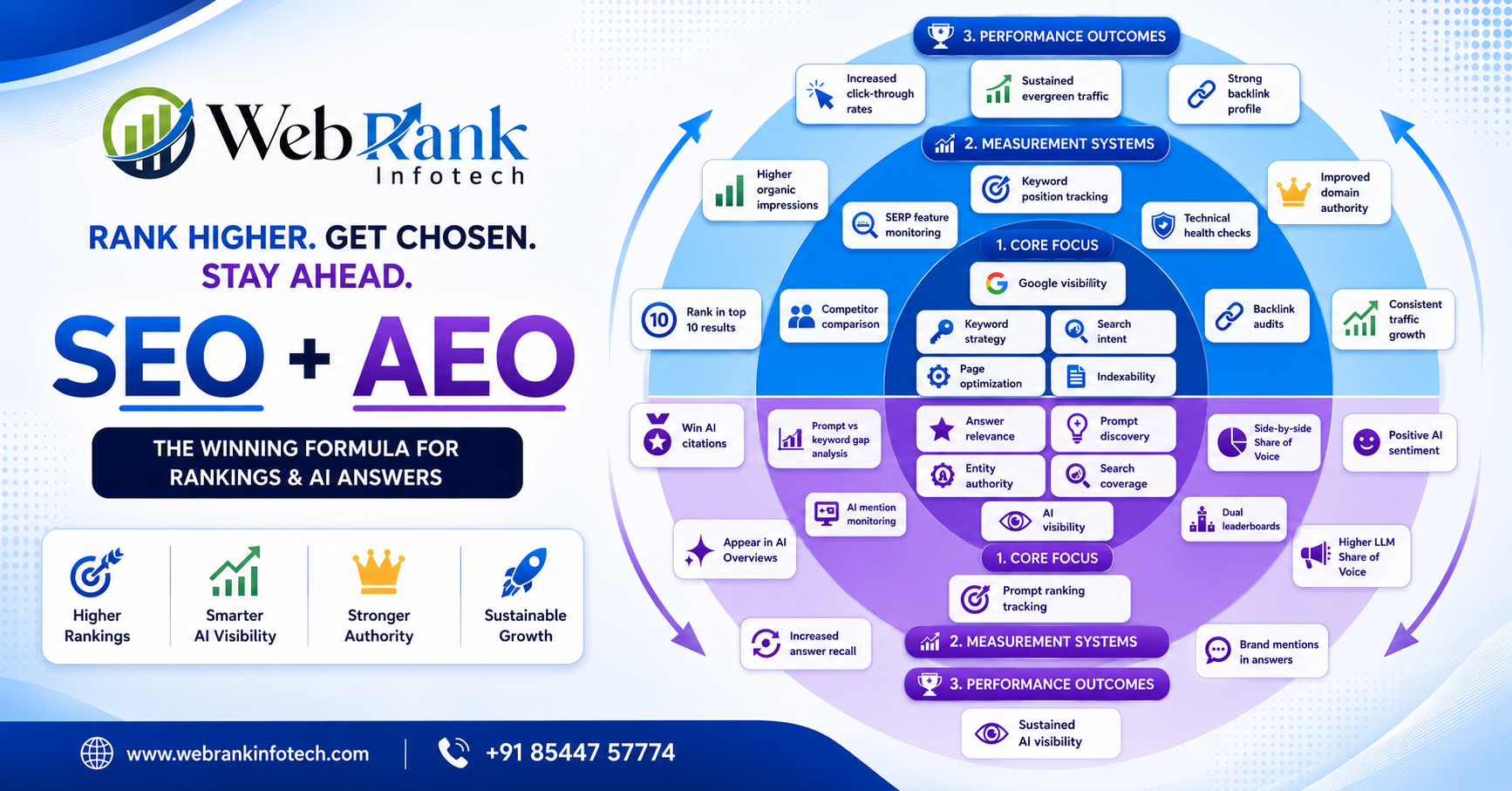
SEO and AEO strategy is no longer optional — it is the foundation of modern digital visibility. As search behaviour shifts from traditional Google results to AI-generated answers from Claude, ChatGPT, and Gemini, brands that master both Search Engine Optimization and Answer Engine Optimization will dominate every channel. This guide covers the exact framework, measurement systems, and action steps you need to rank on Google and win AI citations. What is SEO and AEO strategy and why does it matter? Most marketers are familiar with SEO — optimizing pages to rank in Google search results. But AEO, or Answer Engine Optimization, is the newer discipline focused on making your content the source that AI engines cite when answering user prompts. A combined SEO and AEO strategy ensures your brand wins in both environments simultaneously. Claude AI, ChatGPT, and Gemini all favour content that is factually authoritative, well-structured, and consistently cited across the web. Without AEO, your site may rank on Google but remain completely invisible to the growing audience that relies on AI answers. SEO core focus — building Google visibility The SEO side of the strategy rests on four pillars: keyword strategy, search intent alignment, page optimization, and indexability. Keyword strategy means identifying the exact phrases your audience searches and mapping them to dedicated pages. Prioritize long-tail, question-format keywords that overlap with AI prompts. Search intent alignment ensures every page matches what the user actually wants — informational content for research queries, transactional content for buying queries. Page optimization covers title tags, meta descriptions, heading hierarchy (H1–H4), image alt attributes containing your focus keyword, internal linking, and schema markup. Indexability means your robots.txt, sitemap, canonical tags, and Core Web Vitals are all healthy. A page that cannot be crawled cannot rank — on Google or in AI engines. AEO core focus — building AI visibility The AEO side of your SEO and AEO strategy targets four parallel pillars: answer relevance, prompt discovery, entity authority, and search coverage. Answer relevance means writing a direct, complete answer to the target question within the first 100 words of every page. AI models extract the most direct answer — burying it loses citations. Prompt discovery involves researching the exact prompts users submit to Claude and ChatGPT, not just Google keywords. These prompt-format queries reveal content opportunities invisible to traditional keyword tools. Entity authority is built by ensuring your brand is consistently mentioned across trusted third-party publications, Wikipedia, Wikidata, and industry databases. Claude AI specifically weights sources with strong entity recognition. Search coverage means covering every significant subtopic in your niche comprehensively. AI models prefer sources that can answer follow-up questions without sending users elsewhere. SEO and AEO strategy measurement systems Tracking performance across both lanes requires dedicated measurement for each. For SEO, monitor keyword position tracking weekly using Google Search Console or Ahrefs. Run SERP feature monitoring to identify featured snippet opportunities. Conduct regular competitor comparisons and monthly technical health checks to catch crawl errors early. For AEO, run prompt ranking tracking by manually testing your top 20 prompts in Claude, ChatGPT, and Gemini every week. Set up AI mention monitoring for brand citations. Maintain dual leaderboards — one for Google rankings, one for AI citation frequency — and run prompt versus keyword gap analysis to find topics missing from your AI-answer presence. Performance outcomes of a unified SEO and AEO strategy When executed correctly, a combined SEO and AEO strategy delivers outcomes across both channels. On the SEO side: sustained evergreen traffic, top 10 Google rankings, higher organic impressions, increased click-through rates, a strong backlink profile, improved domain authority, and consistent traffic growth. On the AEO side: winning AI citations from Claude, ChatGPT, and Gemini, appearing in AI Overviews, higher LLM Share of Voice, positive AI sentiment, brand mentions inside AI-generated answers, sustained AI visibility, and increased answer recall. 5 steps to implement your SEO and AEO strategy today Step 1 — Audit your entity footprint. Search your brand in Claude and ChatGPT. If the model cannot describe you accurately, fix it by earning citations in established publications and building a Wikidata presence. For external reference, visit schema.org to implement structured data correctly. Step 2 — Add direct answers to existing pages. Reformat your top traffic pages to include a clear, concise answer in the opening paragraph. Apply FAQ schema markup to make answers machine-readable. Step 3 — Build prompt-optimized content. Write pages targeting exact questions users ask AI engines. Use the question as your H1, answer in 50–100 words, then expand with supporting detail. Step 4 — Strengthen your backlink profile. One backlink from a domain authority 70+ publication does more for your SEO and AEO strategy than fifty low-quality links. Pursue guest posts, original research, and industry reports. Learn more at Ahrefs Blog for backlink building guidance. Step 5 — Run a weekly AI citation audit. Every Monday, test your 20 most important prompts across Claude, ChatGPT, and Gemini. Log citations and track trends over 90 days. Conclusion A strong SEO and AEO strategy is the single most important investment a brand can make in today’s rapidly evolving digital landscape. Google traffic remains essential — but AI-generated answers are growing faster than any other discovery channel. Brands that build both lanes now, with unified measurement and compounding content authority, will own the next decade of digital visibility. Start with your core focus areas, build measurement systems around both channels, and let the performance outcomes — rankings, citations, Share of Voice, and brand authority — compound over time.

SEO and AEO Strategy: The Complete Guide to Rank on Google and Win AI Citations Read More »

Google Killed FAQ Rich Results

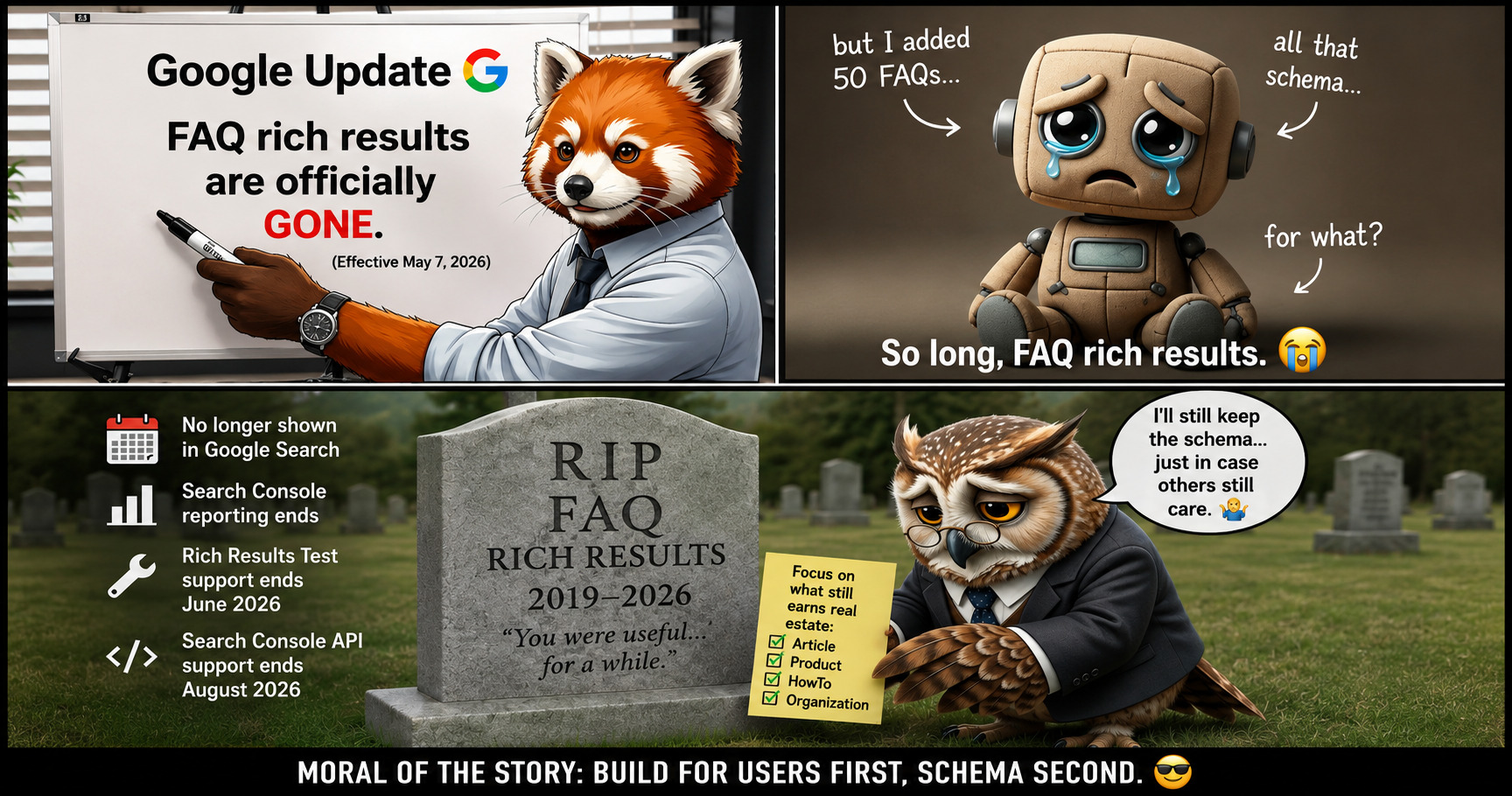
Google FAQ Rich Results Removed: 5 Things Every Website Owner Must Know

Google FAQ rich results removed — and if you have not heard about this yet, you are not alone. Thousands of website owners and marketers across the world are still confused about what exactly happened, why Google made this decision, and what it means for their website rankings going forward. Let’s get straight into it and cover everything you need to know. What Were Google FAQ Rich Results Before They Were Removed? FAQ rich results were a special Google Search feature that allowed websites to display expandable questions and answers directly inside the search results page. When you added FAQ schema markup to your web pages, Google would show your questions right below your link in search results — users could expand each question without ever clicking through to your website. It was a genuinely powerful feature. Websites using FAQ schema were seeing click-through rate improvements of 20 to 30 percent compared to standard listings. Marketers loved them. SEOs built entire content strategies around them. And now — after 7 solid years of being live — Google FAQ rich results removed this feature from Search entirely. Why Were Google FAQ Rich Results Removed After 7 Years? Google has not published a lengthy explanation, but the pattern is very clear when you look at the history. When FAQ schema first launched in 2019, it genuinely helped users get quick answers to real questions. But over time — just like every other SEO feature before it — websites started abusing it. Marketers were adding 50, 60, sometimes 100 FAQs to every single page purely to claim more space in search results, even when those questions added zero real value for actual visitors. The results page was getting cluttered with walls of expanded FAQ boxes that were not actually helpful to anyone. Google’s core goal has always been to show users the most relevant and useful results possible. So Google did what it always does when a feature gets abused — it removed it entirely. This same pattern has repeated itself across 15 years of SEO history. Keyword stuffing worked until it did not. Exact-match domains worked until they did not. Low-quality backlinks worked until they did not. Google FAQ rich results removed after 7 years follows the exact same story. 5 Things Every Website Owner Must Know About Google FAQ Rich Results Removed Thing 1 — FAQ Rich Results Are Permanently Gone From Google Search From May 7 onward, these expandable FAQ boxes stopped appearing in search results entirely. It does not matter how perfectly your schema was coded or how many FAQs you added to each page — Google simply stopped displaying them across all search results worldwide. This is not a bug. This is not a glitch. This is a permanent, deliberate decision by Google. If your pages were showing those expanded question boxes before and they suddenly disappeared, now you know exactly why. Google FAQ rich results removed means they are gone for good — not temporarily paused or rolled back in certain regions. Thing 2 — Google Search Console FAQ Reporting Has Ended If you were using Google Search Console to track how your FAQ schema was performing, that data is now completely gone. The reporting section for FAQ rich results has been fully removed from Search Console. You can no longer see impressions, clicks, or performance data for FAQ schema on any of your pages. This means if you were relying on that data to make content and SEO decisions, you need to shift your attention immediately to the other rich result types that are still being actively tracked and reported inside Search Console. Thing 3 — Rich Results Test Support Is Ending Soon Google’s own testing tool — the Rich Results Test — will stop supporting FAQ schema testing very soon. You will not even be able to check whether your FAQ markup is technically valid using Google’s official tool at Google’s Rich Results Test. The 4 remaining supported schema types you can still test for are Article, Product, HowTo, and Organization. These are the schema types worth your time and investment right now. Thing 4 — Search Console API Support Is Also Being Removed For developers, agencies, and marketing teams that use the Search Console API to pull rich result data into dashboards or reporting tools — FAQ support is being removed from the API as well. You can verify your current rich result performance inside Google Search Console to see what is still active and what needs updating. If your team has automated reporting set up around FAQ rich result performance, you have a limited window to update those workflows. The sooner you act on this, the less disruption you will face on the reporting side.Thing 5 — 4 Schema Types Still Work Perfectly Right Now Here is the genuinely good news — even with Google FAQ rich results removed, structured data as a whole is absolutely not dead. There are 4 powerful schema types that Google still actively supports and displays in search results right now: 1. Article Schema Helps Google understand your blog posts and news articles at a deeper level. It contributes to stronger indexing and is actively used by Google’s AI-generated summaries to pull content from authoritative sources. Every blog post on your website should have this implemented without exception. 2. Product Schema Absolutely essential for any e-commerce or product-based business. Product schema displays price, availability, star ratings, and customer reviews directly in search results — giving potential buyers key information before they even click your link. Studies show product rich results can increase click-through rates by up to 30 percent. 3. HowTo Schema For step-by-step guides and tutorials, HowTo schema still works well. If your content walks users through a process in clearly numbered steps, HowTo schema helps Google understand the structure of your content and potentially feature it more prominently in results. 4. Organization Schema Helps establish your brand’s official identity inside Google’s knowledge graph — including

Google FAQ Rich Results Removed: 5 Things Every Website Owner Must Know Read More »

Ultimate Guide to 5 Types of Google Ads Campaigns: Choose Smarter, Win Bigger

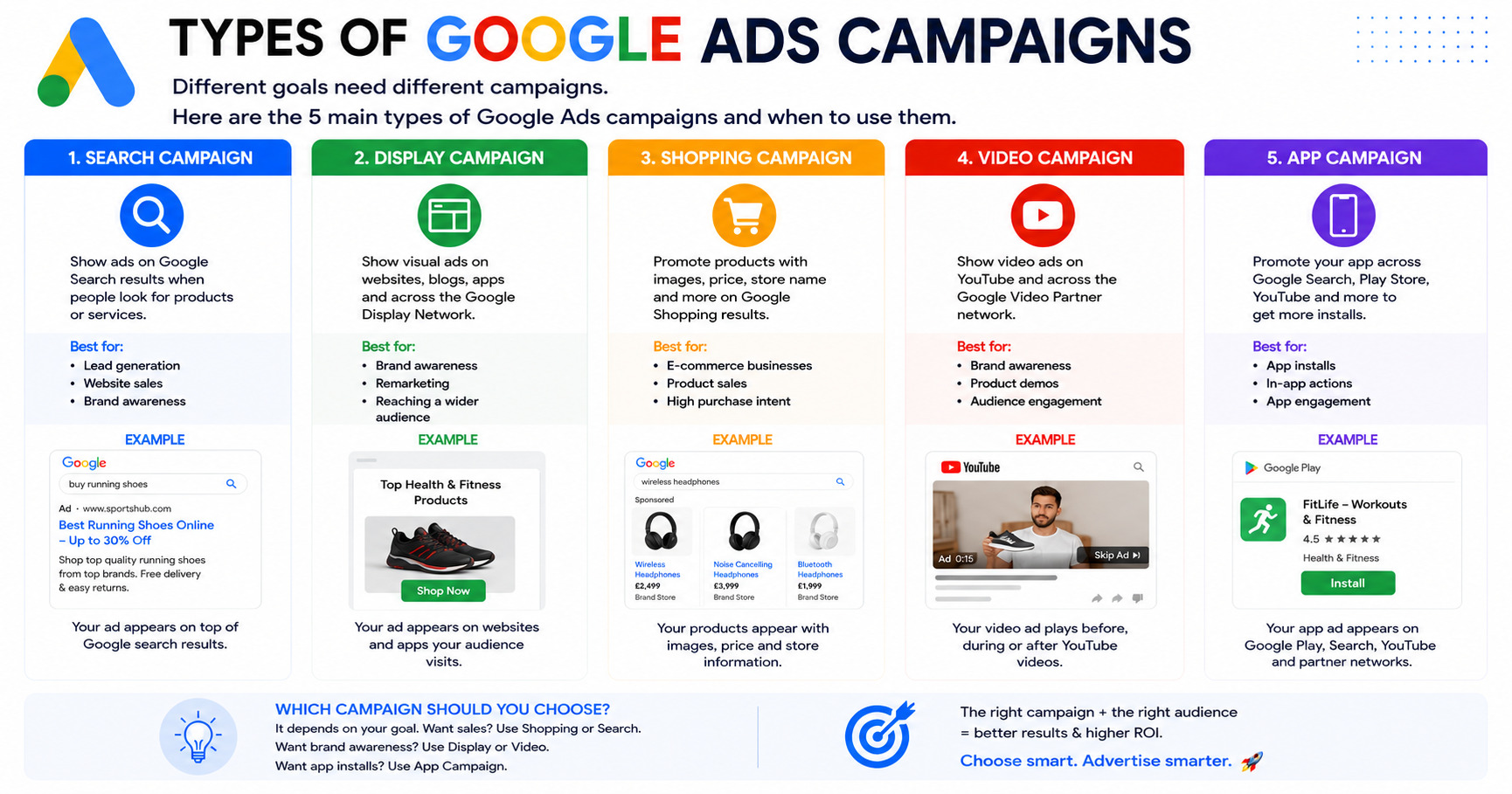
If you’ve ever logged into Google Ads and felt completely lost staring at all the campaign options — you’re not alone. Most business owners and even some marketers feel the same way. The good news? Once you understand what each campaign type does and when to use it, the whole thing becomes much less overwhelming. In this guide, we’re breaking down all 5 types of Google Ads campaigns in plain, simple language. No jargon. No fluff. Just honest, practical advice to help you spend your ad budget where it actually counts. Let’s get into it. Why Choosing the Right Campaign Type Matters Here’s something Google won’t tell you upfront — running the wrong type of campaign for your goal is one of the biggest reasons businesses waste money on ads. A clothing brand running Search ads when they should be running Shopping ads. A mobile app company pouring money into Display when they need App campaigns. It happens all the time. And the result is always the same — poor results, frustration, and the belief that “Google Ads doesn’t work.” Google Ads absolutely works. You just need to match the right campaign to the right goal. That’s exactly what this guide is here to help you do. 1. Search Campaign — Show Up When People Are Ready to Buy Best for: Lead generation, website sales, brand awareness What It Is Search campaigns are the most common type of Google Ads — and for good reason. These are the text ads that appear at the top of Google search results when someone types in a keyword related to your business. For example, if someone searches “buy running shoes online,” a Search ad from a shoe retailer appears right at the top — before any organic results. How It Works You choose keywords you want to target, write compelling ad copy, set your budget, and Google shows your ad to people actively searching for those terms. You only pay when someone clicks — which is why it’s called Pay Per Click (PPC). Why It’s Powerful The biggest advantage of Search campaigns is intent. The person searching already wants what you’re offering. They’re not casually browsing — they’re actively looking. That makes Search ads one of the highest-converting campaign types available. When to Use It Use Search campaigns when you want immediate leads or sales, when you have a specific service or product to promote, or when you know exactly what your customers are typing into Google. 2. Display Campaign — Stay Visible Everywhere Your Audience Goes Best for: Brand awareness, remarketing, reaching a wider audience What It Is Display campaigns show visual banner ads — images, graphics, and sometimes animations — across millions of websites, blogs, and apps that are part of the Google Display Network. This network reaches over 90% of internet users worldwide. How It Works Instead of targeting people by what they search, Display campaigns target people based on their interests, demographics, browsing behaviour, or whether they’ve previously visited your website (remarketing). Why It’s Powerful Think about it — someone visits your website, doesn’t buy anything, and leaves. With a Display remarketing campaign, your ad follows them across the web, reminding them about your brand until they’re ready to come back and convert. It’s one of the most effective ways to stay top-of-mind. When to Use It Use Display campaigns when you want to build brand awareness at scale, when you want to remarket to people who’ve already shown interest in your business, or when you want to reach a broad audience at a lower cost per impression. 3. Shopping Campaign — Perfect for Products That Sell Themselves Best for: E-commerce businesses, product sales, high purchase intent What It Is Shopping campaigns are designed specifically for businesses that sell physical products. When someone searches for a product on Google, Shopping ads appear with an image, price, store name, and sometimes reviews — right at the top of the page. How It Works Instead of bidding on keywords, Shopping campaigns pull product information directly from your Google Merchant Center feed — your product catalogue. Google then matches your products to relevant searches automatically. Why It’s Powerful Shopping ads are incredibly effective because they show the user exactly what they’re getting — the product image and price — before they even click. This means the people who do click are already interested and more likely to buy, giving you a much higher conversion rate. When to Use It Use Shopping campaigns if you run an online store and want to drive direct product sales. If someone is searching “wireless headphones under ₹3,000,” a Shopping ad with your product, price, and brand puts you right in front of a buyer who is ready to purchase. 4. Video Campaign — Tell Your Story Where Attention Lives Best for: Brand awareness, product demos, audience engagement What It Is Video campaigns run ads on YouTube and across Google’s Video Partner Network. These can appear before videos (skippable or non-skippable), during videos, or as standalone ads in YouTube search results. How It Works You create a video ad — anything from a 15-second brand clip to a longer product demo — and target it based on audience demographics, interests, keywords, or specific YouTube channels. You typically only pay when someone watches a significant portion of your ad. Why It’s Powerful Video is the most engaging content format on the internet. A well-made video ad can communicate your brand story, showcase your product in action, or build an emotional connection with your audience far more effectively than any text or image ad. For businesses launching new products or trying to explain a complex service, Video campaigns are unmatched. When to Use It Use Video campaigns when you want to build brand recognition at scale, when you have a product that benefits from a visual demonstration, or when you want to engage a younger, highly active online audience. 5. App Campaign — Get Your App in Front

Ultimate Guide to 5 Types of Google Ads Campaigns: Choose Smarter, Win Bigger Read More »

SEO, AEO, and GEO: The Three Layers of Search Visibility Every Business Needs to Understand

SEO, AEO, and GEO: The Three Layers of Search Visibility Every Business Needs to Understand

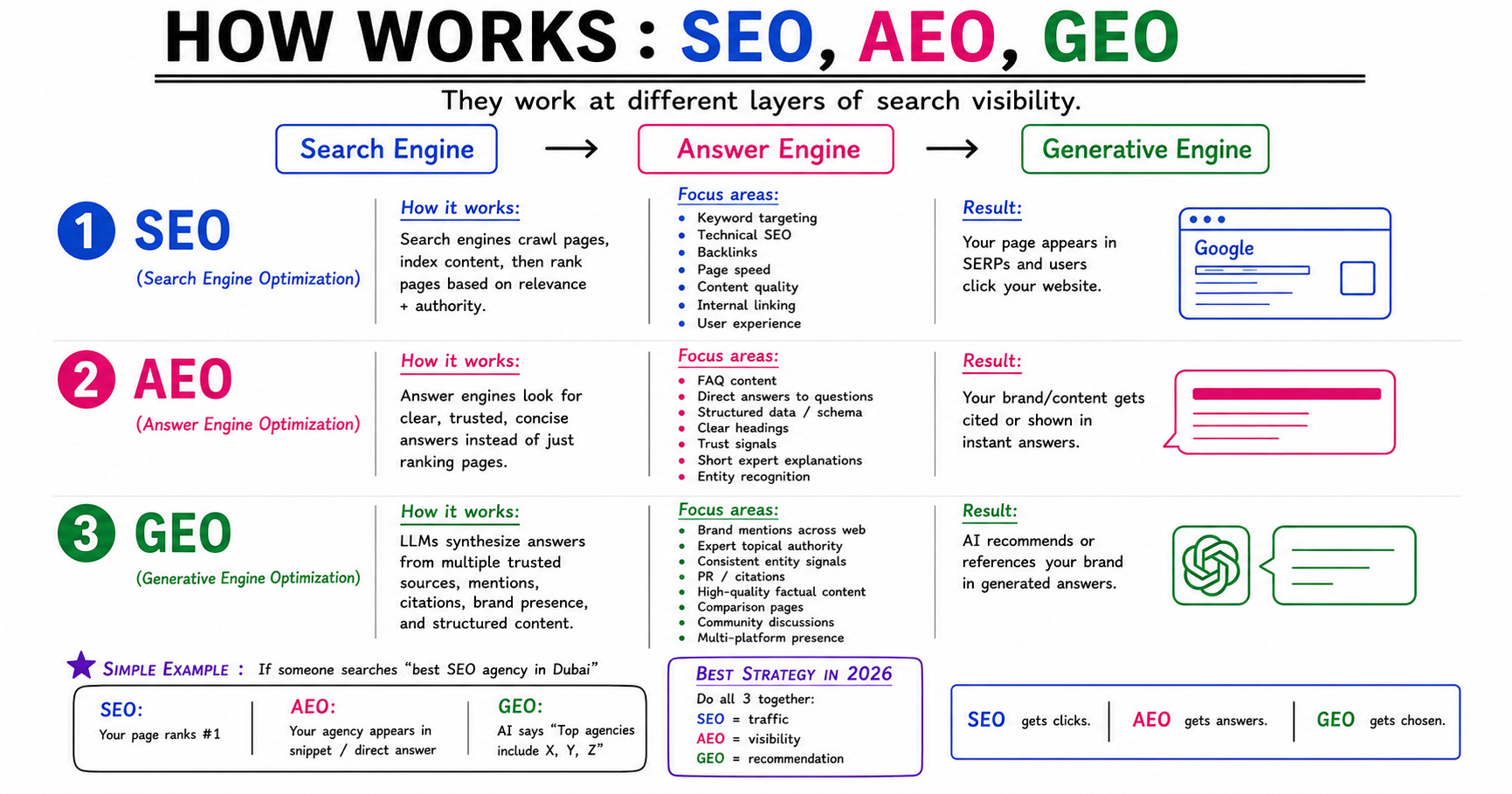
If you’ve been doing digital marketing for a while, you probably know what SEO is. But lately, two new terms have been quietly taking over the conversation — AEO and GEO. And if you’re not paying attention to all three, you’re likely leaving a lot of traffic, visibility, and customers on the table. In this blog, we’re going to break down SEO, AEO, and GEO in plain, simple language so you understand what they are, how they work, and why your business needs all three working together. Let’s get into it. First, Why Does This Even Matter? The way people search for things online has changed a lot in the last few years. Not too long ago, you typed something into Google, clicked a link, and visited a website. Simple. But now? People ask voice assistants questions. They get instant answers right inside search results without clicking anything. They ask AI tools like ChatGPT or Gemini for recommendations before they even open a browser. The search journey has moved across three very different types of engines — Search Engines, Answer Engines, and Generative Engines — and each one works in its own way. That’s exactly where SEO, AEO, and GEO come in. Each one helps you show up in a different layer of this new search world. 1. SEO — Search Engine Optimization SEO is the foundation. It’s been around the longest, and it still matters enormously. How It Works Search engines like Google work by crawling your website, reading and indexing your content, then deciding where to rank your pages when someone searches for something. The better your page is — in terms of relevance, authority, and technical quality — the higher it ranks. What SEO Focuses On The Result When your SEO is done right, your page shows up in SERPs (Search Engine Results Pages) and people click through to your website. More organic traffic, more leads, and more business — without paying for ads. Think of SEO as the engine that drives traffic to your front door. 2. AEO — Answer Engine Optimization AEO is where things start getting interesting — and where many businesses are quietly falling behind. How It Works Answer engines — think Google’s featured snippets, the “People Also Ask” boxes, and voice search results — don’t just rank pages. They pull direct answers from web pages and show them right there in the search results, without making the user click anywhere. So instead of just ranking your page, you want your content to become the answer that gets highlighted. The goal here isn’t just to rank — it’s to be so clear and concise that the search engine uses your words directly. What AEO Focuses On The Result Your content gets cited or displayed as an instant answer. Your brand name might appear in a snippet, a voice response, or a direct answer box — even if the user never clicks through to your website. That might sound a little frustrating at first, but here’s the flip side: when someone sees your brand answering their question clearly and accurately, they remember you. And when they’re finally ready to buy, they come to you — because you’re already the authority in their mind. 3. GEO — Generative Engine Optimization GEO is the newest layer — and it’s quickly becoming one of the most important things to understand. How It Works Generative AI tools like ChatGPT, Google’s AI Overviews, and Perplexity don’t work like traditional search engines at all. They don’t just find pages and rank them — they read and synthesize information from multiple trusted sources and generate a complete, conversational answer for the user. So when someone asks an AI, “What’s the best digital marketing agency in my city?” — the AI pulls together information from across the web: mentions, citations, reviews, expert content, and authoritative sources. Then it generates its own recommendation. If your brand isn’t being talked about, cited, or mentioned in trustworthy places online, the AI simply doesn’t know you exist — and it won’t recommend you. What GEO Focuses On The Result When someone asks an AI tool for a recommendation or information in your field, the AI mentions or recommends your brand by name. This is essentially word-of-mouth at a massive scale — but powered entirely by machines reading the web. A Real-World Example That Makes It Crystal Clear Let’s say someone searches for “best digital marketing agency in Ludhiana.” Here’s what happens across all three engines: Engine Type What Happens SEO Your website ranks at the top of Google’s search results page AEO Your agency appears in the featured snippet or direct answer box GEO An AI tool says “Top agencies in this space include…” and names your brand Each outcome reaches a completely different type of searcher. Some people scroll through Google results and click links. Some read the instant answer box and make a decision right there. Some ask AI tools before they even open a search engine. If you’re only doing SEO, you’re only reaching one group — and missing the rest. Why You Need All Three Working Together Here’s the honest truth most marketing blogs won’t tell you directly: you can’t afford to pick just one of these strategies. Together, these three strategies cover the entire modern search journey from start to finish. Miss one layer, and you become invisible to a whole segment of potential customers who are actively looking for exactly what you offer. The businesses that understand this now and start building all three layers will have a significant advantage over those who wait until it becomes obvious. Quick Recap Before You Go All three work at different layers of search visibility. All three matter. And the best results always come when you use all three in harmony — not just one in isolation. If you found this helpful, share it with someone who’s been asking why their SEO alone isn’t driving results like it used to. The search

SEO, AEO, and GEO: The Three Layers of Search Visibility Every Business Needs to Understand Read More »

Scroll to Top